
PayPal (PP) is an international payment system anywhere in the world. Therefore, in this article, we will breakdown how to open a PayPal account right here in Nigeria.
Most of us know what a PayPal account is. And some of us may probably have used it to make and receive payment one time or the other. But, for those who have little information about it, we will explain what a PayPal account is. And above all, we will detail the process of opening and verifying a PP account in Nigeria.
So what is A PayPal Account?
A PayPal account is an internet payment system owned by PayPal Holding Inc. It is the most used internet payment processor, backing payment in almost all countries of the world. A few years back, Nigeria was barred from using PP, but that has changed, with some restrictions though.
Read Also: https://techcorner.ng/reviews/10-facts-about-uba-africard-card-you-should-know/
Having a PayPal account enables you to shop online and make payments without leaving your card details. Also, PayPal is a stress-free way to buy on Amazon, Godaddy, Aliexpress, Ebay, and other foreign-based e-commerce sites.
Having explained what PP is, the next step is to try and open one, right here in Nigeria.
How to Open PayPal Account in Nigeria
The steps are as follows:
- Click the PayPal website on “www.paypal.com.”
- On the PP site, click on Menu, which is at the top left corner: This will expand the option.
- On the form, fill in your email address and create a strong password.
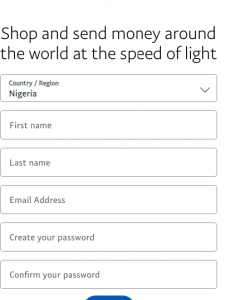
paypal from Nigeria - Click on ‘Continue’ which will take you to the 2nd page of the form.


- Then, fill in your personal information.
- Ensure that your Street Address 1 is the same as the address you used to open your bank account of the ATM card as you will link the card with the PP account. Do not fill the Street for Address 2.
- Then click on the box to accept the User Agreement and Privacy Policy.
- Click on Agree and Continue.
When you click Agree and Continue, PayPal will create an account for you in Nigeria. The next step is to verify and confirm your PayPal account.
How to Verify Your Nigeria PayPal Account
To verify your new PP Account, you will go into your email inbox which you used to create the Paypal account. There, you will see a link in your inbox. Activate this Link by clicking on it. Once you have done is this, Paypal will verify your account.
This will give you first-time login access to your PP account.
While you are still within your inbox mail, find and click on ‘get verified box.’

Click on Link a card.
Type in your Master or Visa card details and click on Save.
Afterward, Paypal will charge $1.95 into your account, which they will refund within hours. So, the purpose of the deduction is to confirm that the card belongs to you. Above all, this charge also creates a 4-digit code which you will use in the verification of the card.

With the 4-digit code sent to you, log in to your PP account, click confirm credit card, enter the code, and click continue box. The unique code is the 4-digit number after PP* in the SMS received from your bank.
That done, you have created and verified your PP account from Nigeria. The next step is to load the account with money and begin to use it to shop and pay for goods online.

Funding Your Nigeria PayPal Account
At present, you cannot load money into your Nigeria PP Account because of the restrictions still hanging on Nigeria. But, you can use your new PP account to make payments online.
Payment with the new PayPal account is directly from the fund in the Master or Visa card you linked to your PayPal. So you might not need to fund your PP account.
They will deduct the money from a Nigerian bank account as you shop online through the PayPal account.
Read Further https://techcorner.ng/how-to/how-to-buy-paypal-in-nigeria-through-monex-ng/
Asides the restriction on funding your PayPal account, Nigerians can still not receive PP funds. With time, we believe that they will remove all bans on Nigeria and everyone will be able to enjoy the full features of this payment processor.
In the meantime, keep shopping with your newly created Nigeria PayPal account.