Amazon has grown to become the biggest online store in the United States of America and across all other Countries of the world. It is probably the most visited online store all over the world because of its varieties of products available for shoppers.
There is perhaps nothing anyone wants to buy that cannot be found on the Amazon store at a click
of the mouse, ranging from books, fashion accessories, baby items, lifestyle products, computers, etc.
Amazon is a market place where the whole world shops from. Every day, all over the world, someone somewhere is clicking the mouse on his laptop to conclude a purchase. This is because
a large percentage of goods sold on the Amazon platform is reliable, authentic, and sold by verified Amazon sellers.
Read Further https://techcorner.ng/reviews/e-commerce-sites-in-nigeria-the-top-ten/
Ordering from the Amazon to Nigeria is simplified in the steps analyzed below.
Get a US Based Address
The First Step is to determine which US address to ship the goods to. Shipping to a Nigerian address can be cumbersome and expensive, but there are more accessible options. If you have a friend or a family resident in the US, the goods can be shipped to his/her address where Amazon ships free to. (Note: Amazon ships free to US-based addresses).
Another option is to register with logistic companies such as www.myUs.com, shoptomydoor, etc. Online US-based Logistic Companies who give you a US address where Amazon can ship the goods to. Once myUS.com receives the products, they will ship to your Nigerian address.
Open an Account with Amazon
That settled, the next step is to open an account with Amazon. Visit Amazon’s website and along the top of the site you will see a task bar that contains several tabs such as departments, prime, video, music, orders, account, and lists and cart.
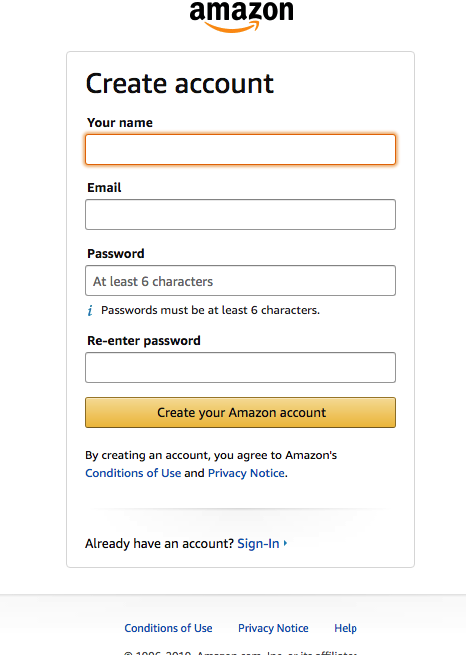
Click on the Account and Lists tab. A new window will pop up with a list of options. Directly under the “Sign In” button, you will see a question if you are a new customer. Click on ‘Start Here’ This will take you to a registration form to create a new shopping account. Fill out the registration form. Fill in your name, email, and password.
Add your shipping address. Here you will add the free US delivery address given to you from myUS.com. Click “Save & Continue,” and your account is opened.
Register Your VISA/Master Card
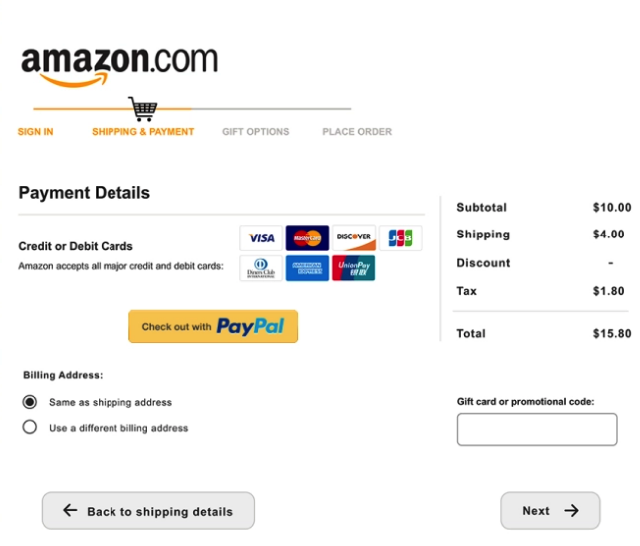
The good news is you can shop using your local bank cards (VISA, Verve or MasterCard). It’s that easy now on Amazon. You can also use a PayPal account to shop right on Amazon if
you have one.
https://techcorner.ng/how-to/how-to-buy-paypal-in-nigeria-through-monex-ng/
Ordering for a Product on Amazon
Now that you have a registered US address, have created an account with the Amazon and a fully funded master/Visa card to make payments, now you are ready to start shopping. Locate the search bar at the top of the page. You will see a grey rectangular box which helps you to narrow your search result to the particular item you want to buy.
The search bar is terrific when you have a specific question in mind to buy from Amazon. Once you have seen the product you desire to buy, you go ahead to select from two indicated options: new or used. Amazon displays the price of the product it has in its warehouse, but you may be able to buy your product from other sellers.
Under the item description, you will see a link titled “Used & new”, which offers you more buying options. One good thing about shopping on Amazon is that they offer free shipping within the USA on prime items or orders over $35 to $50, but used and second-hand items often do not count. When making your selection, don’t forget to consider shipping costs. Go for prime and your items will be brought to our US warehouse free.
Check Out
The next step is to click “Add to Cart.” This leads you to a page where you can confirm items in your cart before making payment. You also get to see more option or related items. From the cart, you can choose any quantity you need for any product.
You can let items sit in your cart for a while until you are ready to make a payment, but Amazon will remove items or adjust their prices based on availability.
Add Your Billing Information
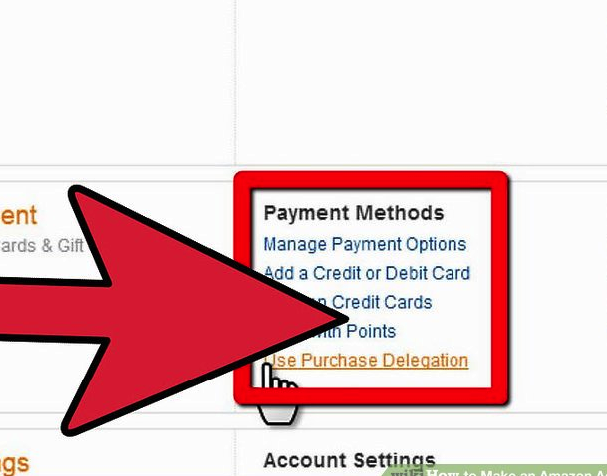
You are required to add your billing information, that is, the details on your bank card. You will Click “Your Account,” then open the “Manage Payment Options” link in the payment section, click “Add a payment method,” choose the payment method you want to add, such as debit card. Then you will enter your payment information.
Note that your billing address(which is your home country address) is different from your shipping address, which is myUS.com address. Then confirm and save your entry.
http://Airpeace Flight Online Booking Steps 2019
Making Payment on Amazon
Once you are finished with the orders, you Click “Proceed to Check out”. Amazon will prompt you to choose the correct address and payment method for your order. To complete your order, select your shipping address. Amazon will show you any shipping address associated with your account (your US address if you have filled it as instructed above).
Then, select your preferred payment method, if you have more than one payment method. Amazon will list all the payment methods you had earlier indicated. Click “Place your order.” After you’ve completed your order, Amazon will show you your confirmation details. Additionally, each item’s estimated arrival date will appear.
You will have thirty minutes’ period of grace to cancel your order without a penalty if you change your mind. MyUS.com Will Receive and Ship to your Nigerian address Once your item gets to the address of the Us based Logistic company, you will be updated and notified.
Once the goods have arrived, you can pay for shipping to Nigeria and log into their platform to track the shipping progress until it comes at your doorstep in Nigeria.